Baitoworks Workforce Management Made Simple
VI JA EN
Start free
Shift management for businesses in Japan

Shifts, attendance and payroll in one system

Working-hour limit breaches blocked at scheduling time. GPS and face clock-in on the phone. Payroll in one click.
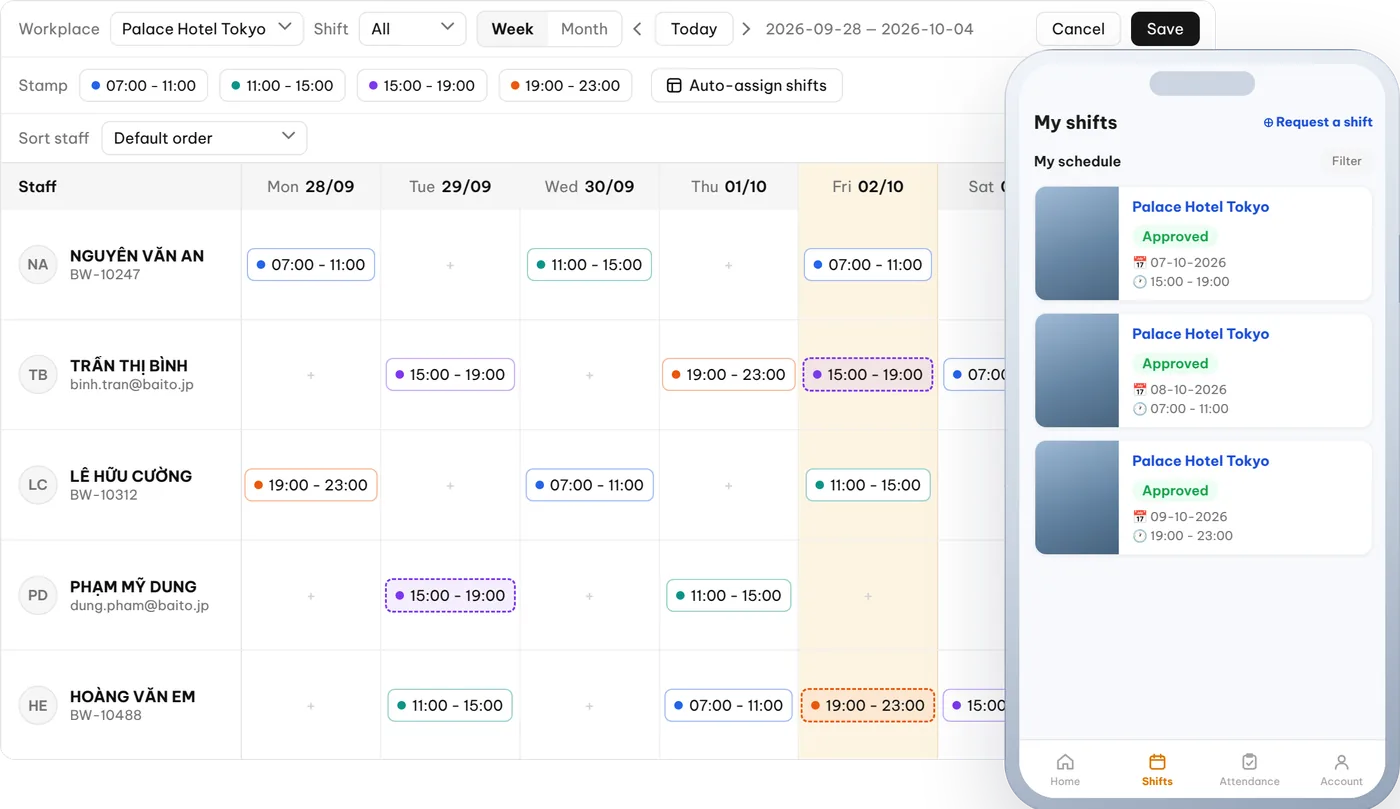
The shift grid in the web admin next to the staff app calendar

Try it now on the Free plan

Employees *
  • Free up to 100 employees, no end date
  • No credit card needed

Save up to

85%

of operating time

Proactive

100%

ready for inspections

Transparent

100%

down to every yen

How Baitoworks works

Are these eating dozens of hours a month?

Scheduling in Excel & LINE

A whole day, still short-staffed.

Hour limits & residence cards

Spreadsheets cannot track consecutive days.

Buddy punching, missed clock-ins

Hundreds of rows to reconcile.

Night & holiday hours by hand

One wrong formula becomes a dispute.

Baitoworks handles every step

Web for managers, an app for staff, one set of data.

01

Schedule by your own rules

  • Pick your priorities: fixed availability, experience, visa, Japanese level.
  • Drag and drop, copy-paste a whole week; save when you are sure.

Weekly schedule: 2–3 days down to 30 minutes.
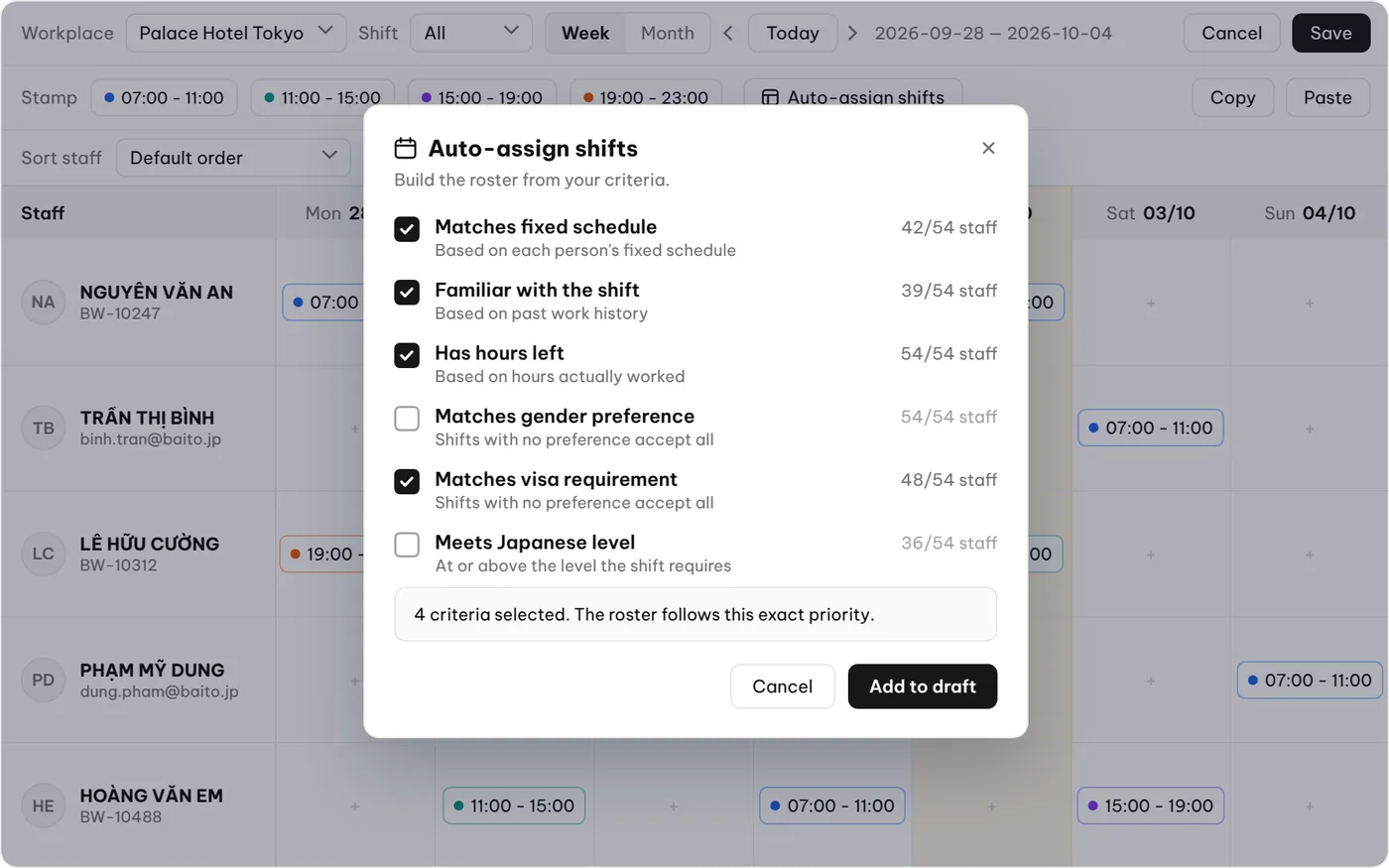
Auto-scheduling dialog with priority criteria: fixed schedule, shift familiarity, remaining hours, visa and Japanese level
02

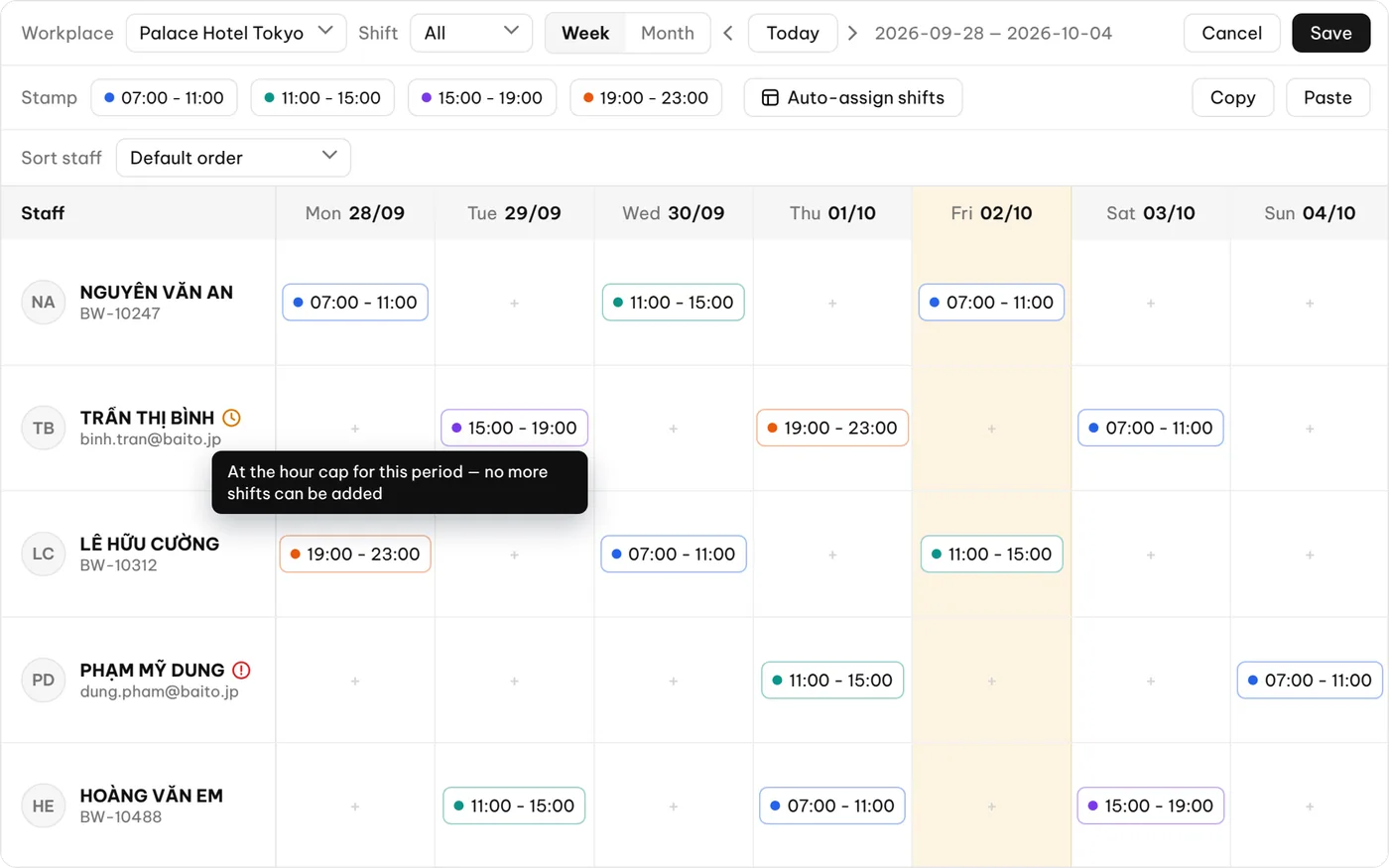
A working-hour limit guard

  • Hour limits over consecutive days, set per group.
  • At the cap, the grid warns you and no more shifts can be added.

Risk stopped at scheduling time.
Weekly shift grid warning that a staff member has hit the hour cap for the period and cannot take more shifts
03

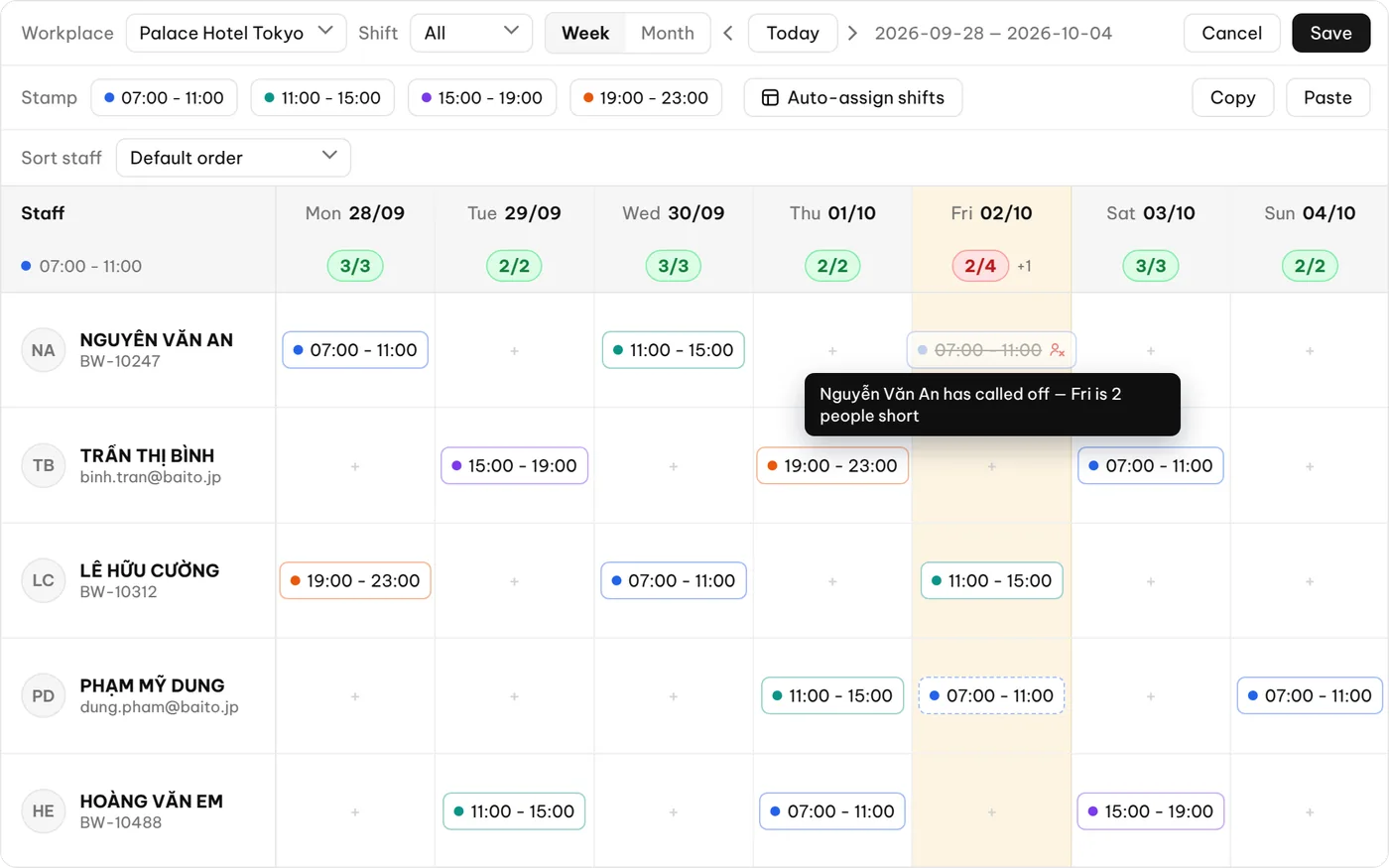
Gaps show up at once, filled in minutes

  • Shifts short of confirmed staff turn red on the grid.
  • Suggests who lives closest to the location’s station.
Weekly shift grid showing confirmed headcount per shift; a shift turns red when a call-out leaves it short
04

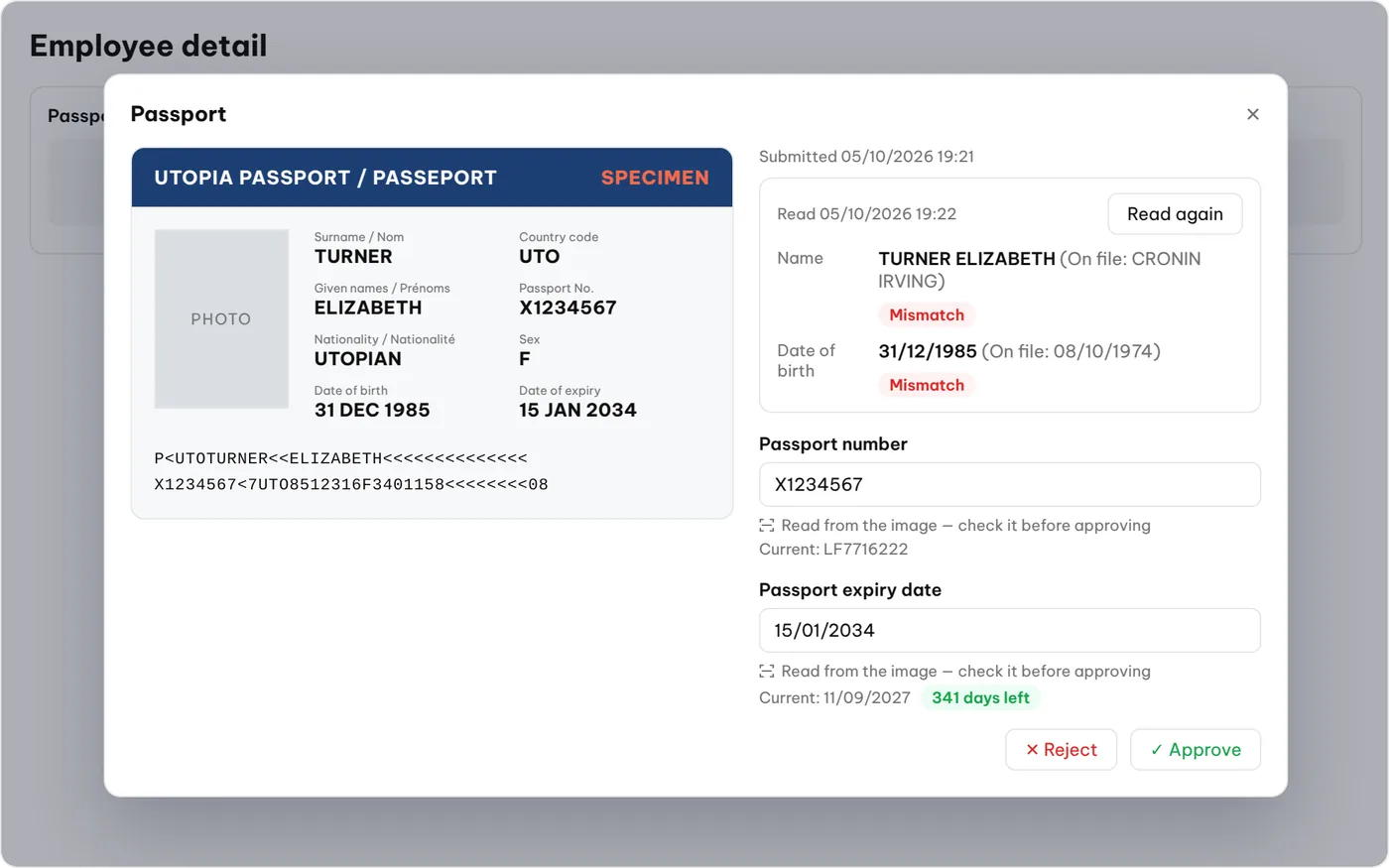
Residence documents read for you

  • Photograph a residence card to get name, number and expiry.
  • A list of upcoming expiries; expired staff cannot be scheduled.
A passport read automatically from a photo, with name, date of birth, number and expiry checked against the record before approval
05

GPS and face clock-in

  • Out of range, fake location or a reused photo — all flagged.
  • No time clocks to buy.
A staff member clocking in on a phone with GPS and face recognition
06

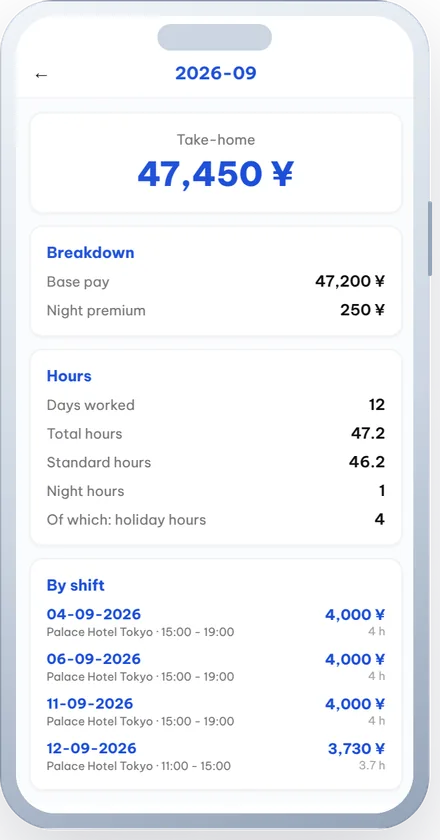
Payroll in one click

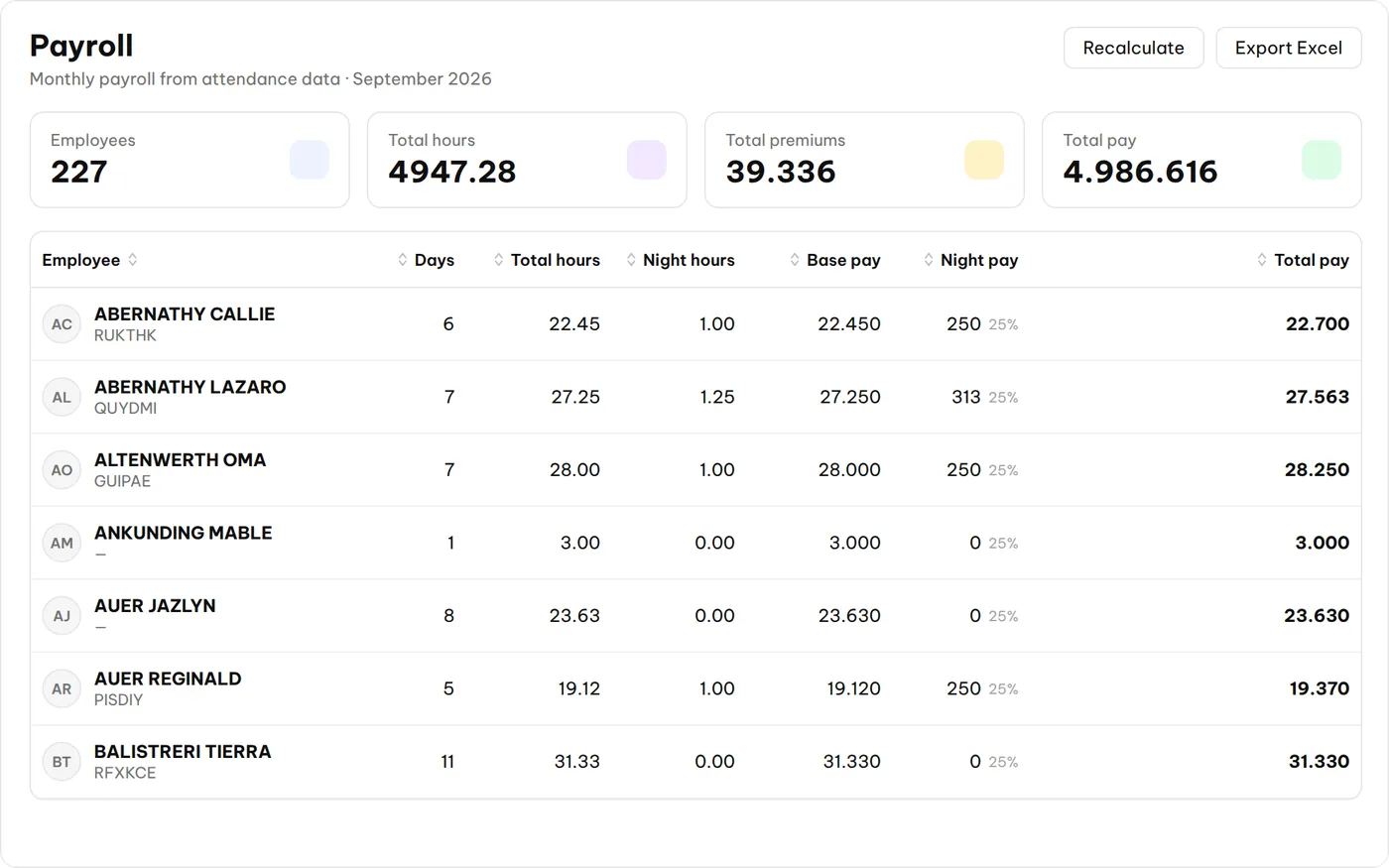
  • Regular, night (22:00–05:00) and holiday hours split automatically.
  • Excel export for accounting; staff see payslips in the app.
Monthly payroll calculated from attendance data, with night hours and allowances split out and an Excel export button Payslip in the staff app: take-home pay, breakdown, hours and each shift

Against the usual way

Excel & LINE Time clock Baitoworks
Weekly schedule 2–3 days Not supported Automatic, 30 minutes
Working-hour limit By eye, easy to miss Not supported Blocked when scheduling
Clock-in Self-reported Device at every site Phone, GPS + face
Residence card expiry Notebook Not supported Read automatically, expiries listed
Night & holiday hours Added by hand Exported, fixed by hand Split automatically, Excel export

Start in 3 steps

Tell us your size

Your environment ready within a week.

Staff install the app

iOS / Android, in their own language.

Run it on the Free plan

Upgrading keeps all your data.

Per person, at one rate

  • No per-module add-ons
  • Unlimited locations
  • Free never expires
  • Free updates
FREE

Up to 100 employees

0 JPY

no end date

  • App & web in Vietnamese – Japanese – English
  • Scheduling, preferences, approval
  • Clock-in on the phone
  • Shift reminders
  • 1 year of data
Start free
ADVANCE

Unlimited employees

100 JPY

/ employee / month

  • Everything in Free
  • GPS clock-in
  • Residence card management
  • Working-hour limit warnings
  • Payroll calculation & export
  • 3 years of data
Talk to us

Prices exclude tax.

Introduction materials

FAQ

Can foreign staff use it?

Yes. The app is in Vietnamese, Japanese and English; each person picks their own.

Does the Free plan expire?

No. It covers up to 100 employees with no end date, and upgrading keeps your data.

Can I manage several branches?

Yes. Head office sees everything; each store manager sees only their own locations. Extra locations cost nothing.

What if someone clocks in away from work?

It is recorded but flagged with a reason for a manager to review — staff are never locked out by weak GPS.

What happens to my data if I stop?

It is yours. You have 60 days to export all of it.

Start free today

Let the system do the paperwork; you look after your customers.

Try the live demo

Or email: [email protected]

Used only to contact you, never shared with third parties.

Get the document

Leave your name and email and the download starts right away.

Used only to contact you, never shared with third parties.